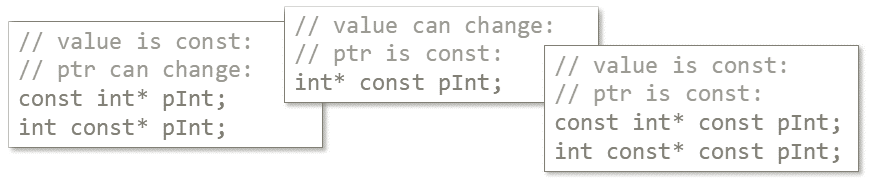
Inside const methods all member pointers become constant pointers.
However sometimes it would be more practical to have constant pointers to constant objects.
So how can we propagate such constness?
The problem Let’s discuss a simple class that keeps a pointer to another class. This member field might be an observing (raw) pointer, or some smart pointer.
One of the key points of modern C++, as I observe, is to be expressive and use proper types. For example, regarding null pointers, rather than just writing a comment:
void Foo(int* pInt); // pInt cannot be null I should actually use not_null<int *> pInt.
The code looks great now, isn’t it?
Last time I wrote about final_act utility, and it seems I’ve stepped into a bigger area that I wasn’t aware of. Let’s continue with the topic and try to understand some of the problems that were mentioned in the comments.
Intro Let’s remind what was the case last time:
Sometimes there’s a need to invoke a special action at the end of the scope: it could be a resource releasing code, flag set, code guard, begin/end function calls, etc. Recently, I’ve found a beautiful utility that helps in that cases.
Let’s meet gsl::final_act/finally.
Intro Follow-up post here: link.
Programming is not only typing the code and happily see how smoothly it runs. Often it doesn’t run in a way we imagine! Thus, it’s crucial to debug apps effectively. And, it appears that the debugging is an art on its own! Here’s my list of tips that hopefully could help in debugging native code.
Visual Studio is my main development environment. I’ve been using this tool probably since version 2003…2005. I am really happy that VS is getting more and more powerful these days and you can also use it on multiple-platforms (through VS Code, for web or cloud apps). What’s even better - it’s free for personal use or if you’re a small company (Community Version)!
You’ve just recompiled a 3rd party library in Visual Studio, copied the .lib file into a proper directory, added dependencies into your final project… recompiled and it worked nicely! Good. So now you can commit the changes into the main repository.
Then, unfortunately, you got a report from a build server (or from your colleague) that your recent change generated 10s of warning messages about some missing files from this new library… why is that?
You’ve just started a new job and landed in front of a huge code base. Great! What a challenge! It would be nice to quickly get a general understanding of your project and be able to comfortably move around in the code. How do you do it?
In the article you can find my list of three set of tools from Visual Assist that might help with this problem.
When you write:
char strA[] = "Hexlo World!"; strA[2] = 'l'; Everything works as expected. But what about:
char *strP = "Hexlo World!"; strP[2] = 'l'; Do you think it will work correctly? If you are not sure, then I guess, you might be interested in the rest of article.
Recently, I’ve written an article about using a .NET third party library to generate reports from apps. You can find it on this in my previous post. In my opinion, the whole idea might be useful, for instance, for performance tests. I often try to make such in my blog.
Let us consider a simple task:
“Use a worker thread to compute a value”.
In the source code it can look like that:
std::thread t([]() { auto res = perform_long_computation(); }; Now, you would like to obtain the result when the computation is completed. How to do it efficiently?
// how does it work? auto i = 0; // ??
C++11 brings us a very useful set of tools. It adds fresh air to the hard life of a programmer. The updated syntax makes the language a more modern and easier to use.
In this post let’s take a quick look at a nice keyword ‘auto’ that, at first sight might seem very simple.